
For most of the last two years, the single most common line in QuickCoach feedback has been some version of "I wish it did nutrition". As of this month it does. QuickCoach nutrition and habit tracking are both live in Pro, and they arrived together on purpose, because they are the two things a client actually lives with on the days you are not in the room.
This is the largest release we have shipped since Hale Health acquired QuickCoach in December 2025. Here is what changed, what it costs, and what it means for your account specifically.
Quick answer
QuickCoach Pro now includes nutrition and multi-habit tracking. Clients photograph a meal or search 2.3 million verified foods, and it logs with calories and macros attached. Coaches assign a different habit stack to every client. Pro is $39/month, or $390/year, with unlimited clients and no separate nutrition or habit fee.
Nutrition, Inside the Plan You Already Send
Nutrition is not a separate tab bolted onto the side of the app. It builds into the same client plans you already write, so food guidance and training sit in one place and you review both the same way.
Three parts to it. Your client can photograph a meal and have it identified and logged, with estimated calories and macros attached. They can search a library of over 2.3 million verified food items, each carrying calorie and macronutrient data, from their phone or from your plan editor. And everything lands in a daily food log you can open without asking them for a screenshot.
The photo feature is the one that changes behaviour, because it removes the excuse. Nobody abandons tracking on day 40 because the macros were hard to calculate. They abandon it because typing out every ingredient of a stir fry at 9pm is tedious, and tedium wins eventually.
One honest caveat, and we would rather say it here than bury it. Photo scanning returns an estimate, not a label reading. It is accurate enough to answer the question you are usually asking, which is whether a client is eating roughly what the two of you agreed. It is not a nutrition label. For exact numbers on packaged food, the verified search is right there.
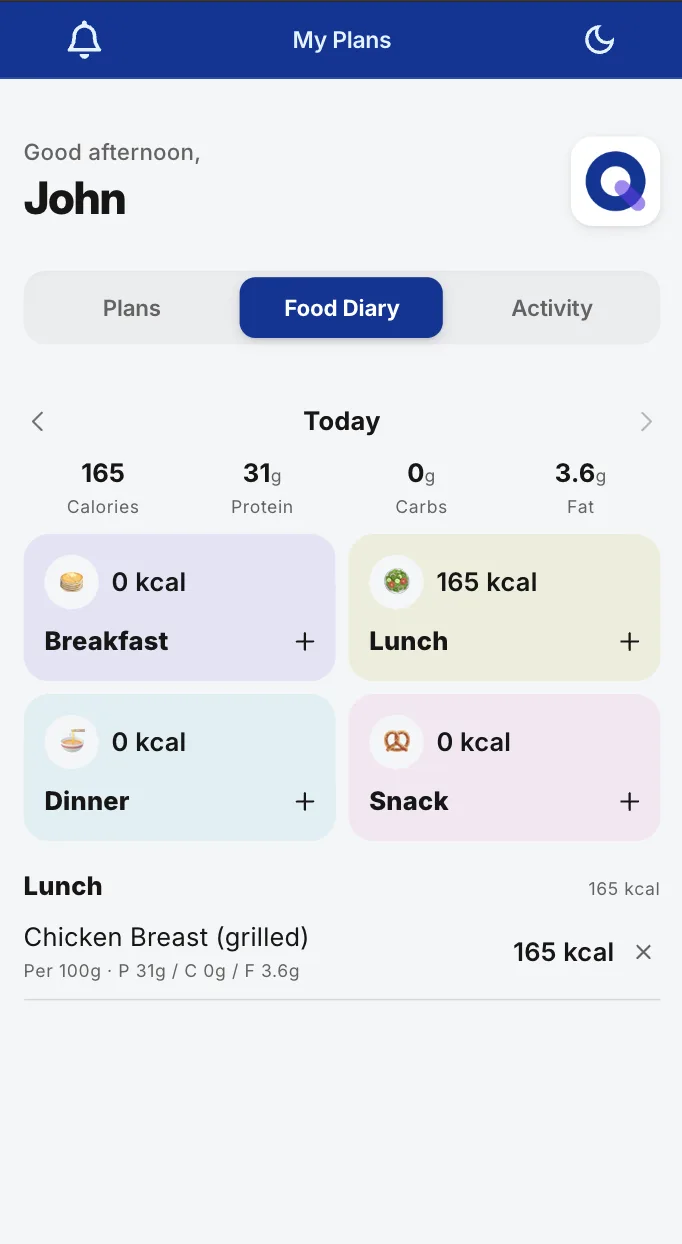
Food Diary. The day rolls up by meal, and you see it without chasing anyone.
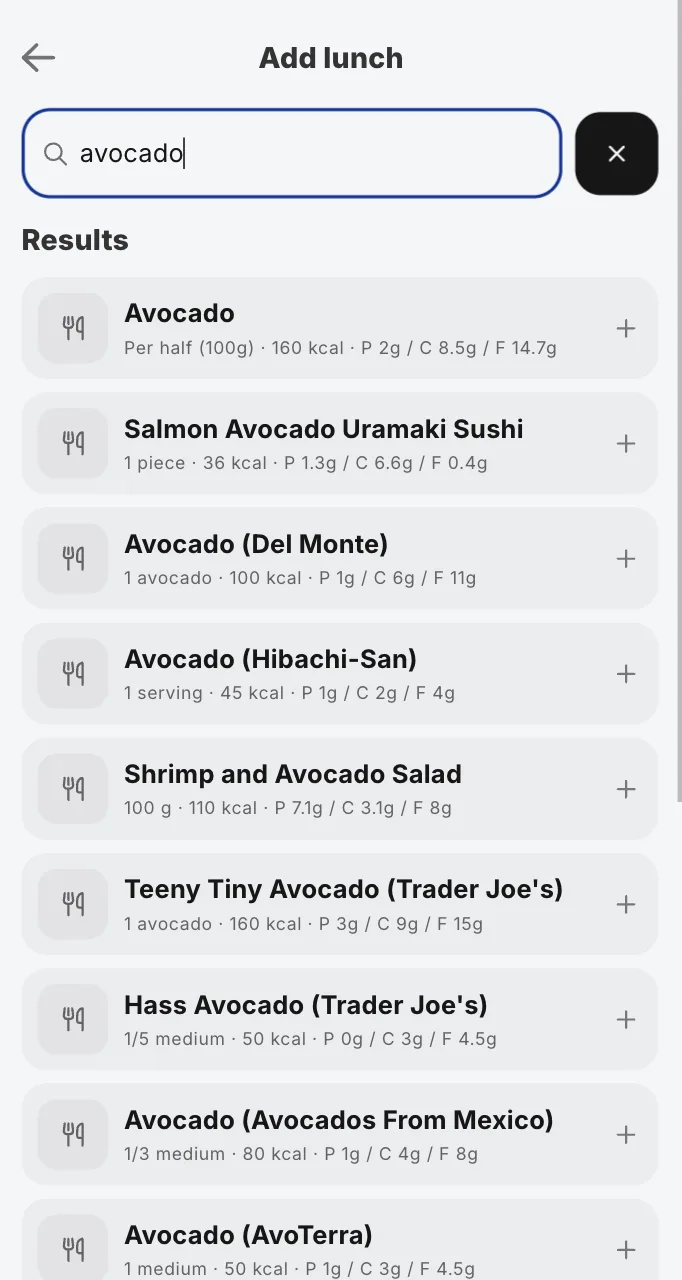
Food search. Over 2.3 million verified items, macros on every result.
Prescribing Food From the Plan Editor
That library cuts both ways. Your client searches it to log what they ate. You search the same 2.3 million items to prescribe what they should eat, without leaving the plan editor you already build training in.
Turn on Nutrition search and the task rows autocomplete against food instead of exercises. Type "chicken" and you get Chicken Breast (grilled) at 165 kcal per 100g, Chicken Thigh at 209, Whole Roast Chicken at 190, each one a click from being in the plan. There is nothing new to learn here. It is the row you have been filling with sets and reps for years, pointed at a different library.
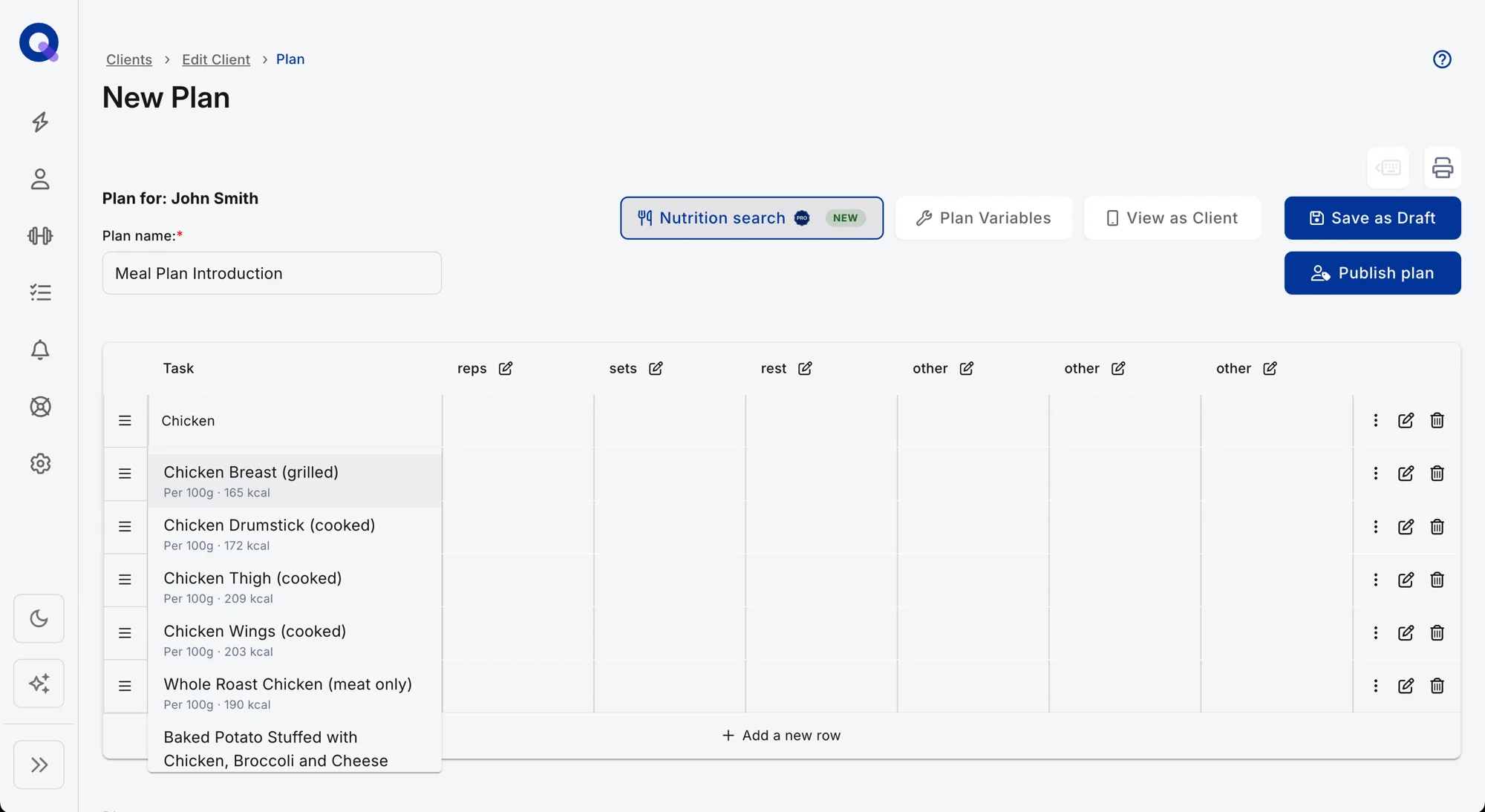
This is the half that closes the loop. Prescribe the meal in the plan, the client logs against it on their phone, and the two sit in one record instead of a plan in one app and a food diary in another.
Habit Tracking That Fits One Client, Not the Roster
Habit tracking is on every plan, including the free one. What Pro adds is the part that matters once you have more than a couple of clients: a different habit stack for each of them.
A generic daily tick box treats a 52-year-old rebuilding a walking routine and a competitive lifter chasing a protein target as the same person. They are not. In Pro you assign multiple habits per client, choose the response type for each (a number, a rating scale, a simple complete button), pull from ready-made packs that cover the ground most coaches assign anyway, and keep the full history. Sleep for one client, steps for another, hydration and mobility for a third.
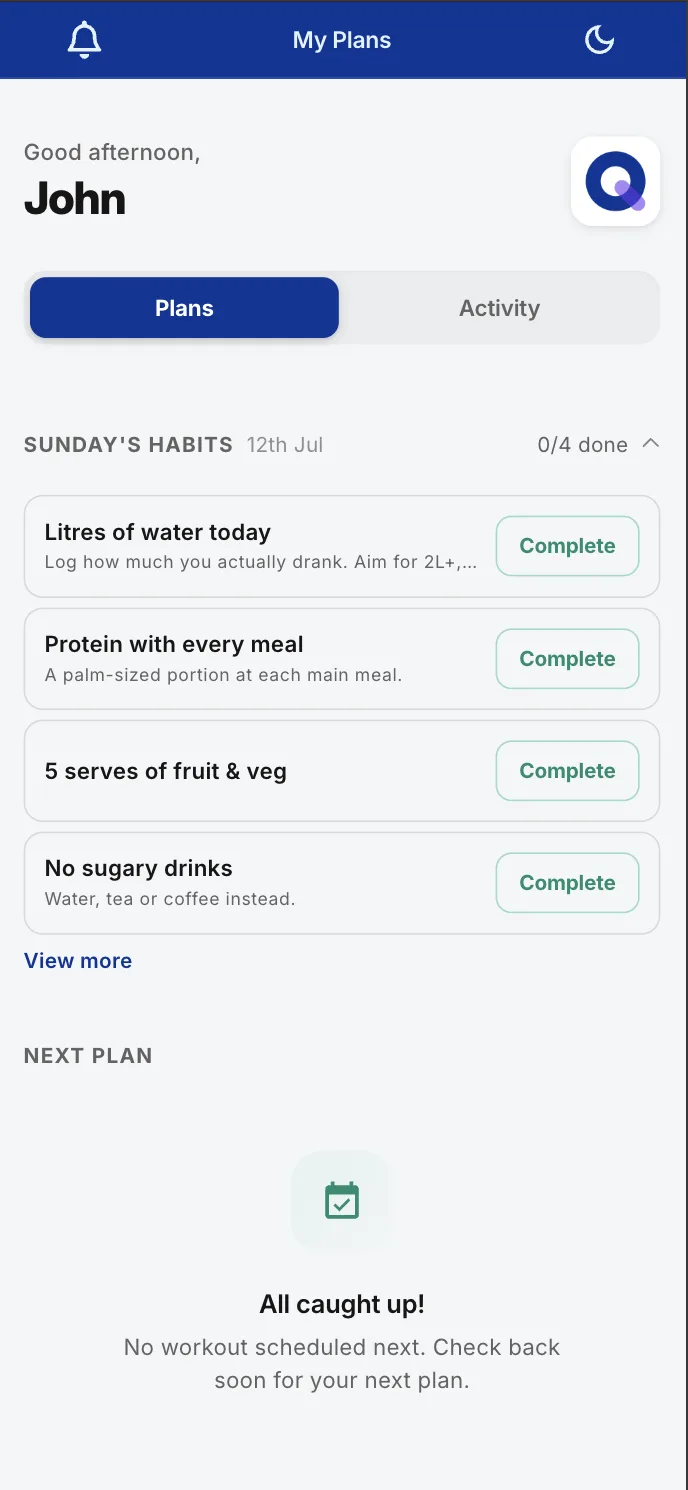
The history is the underrated half. When a client says they have been consistent and the numbers say something else, you are no longer arguing from memory. You are both looking at the same record, which turns an awkward conversation into a factual one.
None of this is a hunch about what coaches want. When we looked at what online coaches actually track across the platform, meal adherence and meal instructions showed up in 43.0% of non-exercise tracking items, habits and lifestyle tasks in 36.9%, and nutrition and macros in 31.1%. Coaches were already doing this work, mostly in spreadsheets and message threads. We were the ones making them leave the app to do it.
The Two New Add-Ons, and What They Are Not
Two optional add-ons ship alongside this release. Both sit on top of Pro, both are billed separately, and nothing described above depends on either of them. If you never buy them, the nutrition and habit features still work in full.
- Coach Workflows, $14.99/month. Automated check-in summaries and client activity and insight reports. It reads and summarises the incoming material so you walk into a follow-up already informed. If check-ins are the spine of how you coach, our guide to running client check-ins is the workflow this automates.
- Nutrition Booster Pack, $12.99/month. Barcode scanning, and only barcode scanning. Worth it if your clients live on packaged food and scanning a wrapper would genuinely save them time each day.
Be clear on that second one, because the naming invites confusion. The Booster Pack is not "nutrition, but you have to pay for it". Food search, food photo scanning, calories, macros and the client food log are all core Pro. Barcode scanning is the single exception, and it is the exception precisely because it is the one feature most clients will not miss.
What Changes for You, by Plan
Two answers, depending on the plan you are on.
| You are on | What you get | What you pay |
|---|---|---|
| Free | Habit tracking, plus everything the free plan already did: full programming, unlimited programs and tasks, up to 20 active clients with no time limit. Nutrition and multi-habit stacks are Pro features. | $0 |
| Pro | Nutrition and multi-habit tracking, plus the rest of Pro: branded client app, branded emails and printouts, push notifications, Training Insights, unlimited clients. | $39/month, or $32.50/month on annual billing ($390/year) |
If you are already on Pro, it is switched on in your account now. No migration, no setup, nothing extra to pay. Full feature-by-feature detail lives in the QuickCoach Pro features and pricing guide, which we updated the same week this shipped.
What the Same Features Cost Elsewhere
We priced nutrition across five platforms in May 2026 at a 30-client roster on monthly billing, using regular published rates rather than promotional ones. The gap is not subtle.
| Platform | Nutrition-capable monthly total | How nutrition is charged |
|---|---|---|
| QuickCoach Pro | $39 | Core. Unlimited clients, so the roster size does not move it. |
| Everfit Pro (35) | $75 | Food journal and macros are core; meal plans are a $39 add-on on top. |
| Trainerize Pro 30 | $95 | $50 base plus the $45 Advanced Nutrition Coaching add-on at 30+ clients. |
| My PT Hub Premium | $105 | Nutrition included, but the tier is set by client count. |
| TrueCoach Pro | $164.98 | MyFitnessPal integration, no separate nutrition charge. The price buys capacity. |
The working is in what nutrition coaching software actually costs, including the part where TrueCoach's $164.98 is not really a nutrition bill at all. A 30-client roster overshoots its 20-client Standard tier, so you are paying for headroom and nutrition happens to come along.
Two ways the category recovers the cost, then. Charge an add-on on top, or bundle nutrition into a tier that a growing roster forces you onto anyway. Ours does neither, which is easier to promise when the plan does not scale with client count in the first place. If you are still weighing the free tier, the free coaching software comparison for 2026 is the better starting point.
Frequently Asked Questions
Does QuickCoach do nutrition coaching now?
Yes. As of July 2026, QuickCoach Pro includes nutrition in client plans: a searchable database of over 2.3 million verified food items with calories and macros, food photo scanning, and a daily food log clients fill in from the same app they open for training. It is part of the $39/month Pro subscription, not a separate nutrition product.
Do I have to pay extra for nutrition or habit tracking in QuickCoach Pro?
No. Food search, food photo scanning, calories, macros, the client food log, and multi-habit tracking with rich check-ins are all part of standard Pro at $39/month. The only nutrition feature billed separately is barcode scanning, which sits in the optional Nutrition Booster Pack at $12.99/month. How to read a month of that habit data in a check-in is covered in our guide to habit check-ins.
How much does QuickCoach Pro cost?
QuickCoach Pro is $39/month on monthly billing, or $390/year, which works out to $32.50/month effective on annual billing. That covers unlimited clients with no per-client fees, so the price does not climb as your roster grows. Nutrition and multi-habit tracking are part of it at no extra charge.
Can free QuickCoach users track habits with their clients?
Yes. Habit tracking is available on the free plan, which supports up to 20 active clients with no time limit. Pro adds the parts that scale: multiple habits per client rather than one, richer check-in response types than a yes or no, ready-made habit packs, and full habit history.
Is food photo scanning accurate enough to coach from?
Photo scanning returns an estimate, not a label reading, and should be treated that way. It is accurate enough to show whether a client is eating roughly what you agreed, which is the question most coaches are actually asking. For exact figures on packaged food, clients can search the verified database or add barcode scanning through the Nutrition Booster Pack.
Try one habit on one client this week
Pick something visible: daily steps, or a hydration check-in. Assign it in week one, before the training conversation gets complicated. Clients who log something small every single day tend to stick around longer than clients who only see you at session time.
Open your dashboardPricing verified July 2026 against published vendor rates and refreshed quarterly. If a figure here stops matching what a vendor charges, tell us and we will correct it: support@quickcoach.fit.