Most coaching software was built one client at a time. That is why coaching a squad online breaks in the same two places every time: version drift as the copies multiply, and no visibility into who is actually doing the work.
The programming itself, the rep ranges, the periodisation choices, the coaching cues, that is your craft. What follows is the mechanics of getting one block to a whole squad without the late-night copy-paste, and without the athlete who quietly stopped logging sessions for three weeks turning up as a surprise.
Quick answer
Squad coaching is a template problem, not a scaling problem. Build the squad's program once, clone it per athlete, and adjust the individual sets that need to change. Tasks and check-ins close the loop, and the coach sees who is doing the work.
Why squad coaching breaks in a 1-to-1 tool
The pattern is familiar. You write a program for one athlete, copy it into a fresh document for the next, adjust the sets, and send both. That is fine for two athletes. At fifteen, the copies start to drift. The first athlete is looking at version two of week three, the ninth is on version one, and nobody can say which block is current.
Software built for one-to-one coaching reproduces the same failure. Assigning a program to fifteen athletes means fifteen separate assignments, fifteen copies to manage, and fifteen places the version can live. The result is that the coaching itself, reading the session logs and deciding the next block, gets pushed to the end of the day, after the admin.
The capacity maths changes too. One program reaches fifteen athletes at once, so a coach who runs a squad can take on more people than the individual model allows, but only if the admin per head stays near zero. The honest capacity discussion, including where a 20-client roster lands, is in our guide to how many clients an online coach can actually handle.
The template-and-clone workflow for coaching a squad online
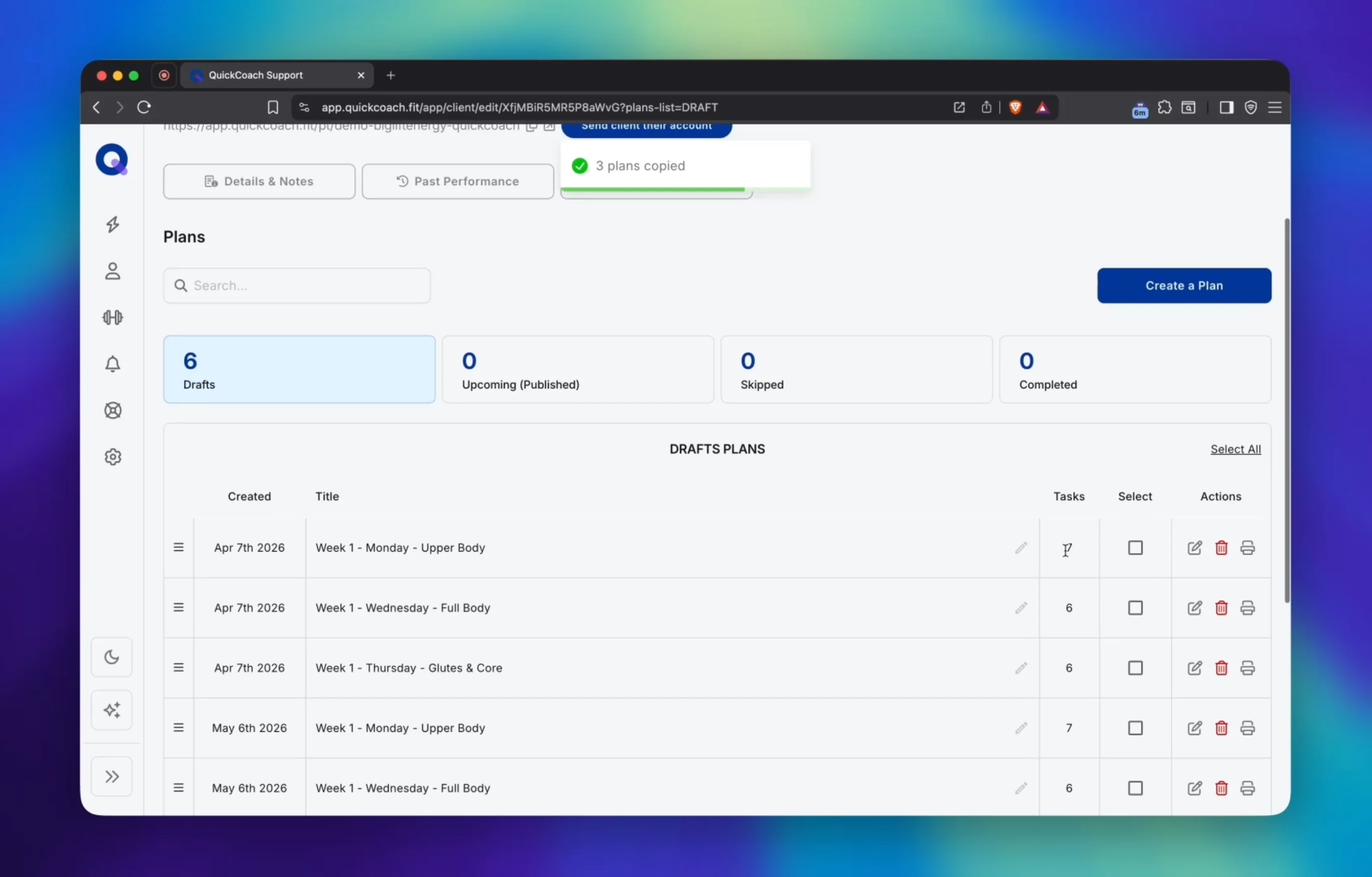
The fix is to build the block once and let the software do the copying. Save the squad's program as a template, then clone it per athlete. Each athlete's clone is their own program in their own client app, delivered on their own schedule, with your edits applied only where they need to be.
The mechanics are the same ones covered in our quick tips on repeating workout programs: clone instead of rebuilding from scratch, and keep templates as the clean starting point so no previous athlete's details ever carry over. The wider strategy, matching templates to assessments and building progression blocks so the library compounds, is in our guide to writing client workout programs faster without cutting corners.
The template is the source of truth for a squad. What each athlete sees is generated from it. If the template holds a four-week block with three sessions a week, the clone carries that structure to every athlete, and the coach changes only the cells that actually differ. Nobody is re-emailed a revised version of the plan, because the coach never emails versions.
Individual tweaks without version drift
A squad run by an S&C coach is rarely uniform. The injured winger gets a reduced conditioning load. The teenager who has never squatted works through a lighter progression. The first-choice hooker is handled differently from the bench. These tweaks are where 1-to-1 tools fork into version hell, and the template workflow removes the fork.
Adjust the sets that need adjusting inside the athlete's clone. The original program stays untouched, and the clone is the working copy. That is the same discipline our repeating workout programs guide describes for week-to-week progression, applied to athlete-to-athlete variation.
The split that stops version drift is a decision rule the coach can hold in one sentence. Change for everyone, update the template and re-clone the athletes who need it. Change for one athlete, edit that athlete's copy and leave the rest alone. The rule works because the software, not the email folder, owns the copies. The definition of how a saved block becomes each athlete's own program, with the coach editing individual sets, sits in our strength and conditioning coaching software pillar.
Tasks and check-ins for a whole squad
Delivery is not only the program. It is the obligations that sit around it: the pre-session warm-up, the extra conditioning, the mobility work, the rehab sets. In QuickCoach a task can carry those, and tasks are unlimited on the free tier. A task assigned to a squad lands on every athlete with its due date, which is the difference between a program existing and a program being done.
Check-ins close the loop. A squad check-in asks the same questions of everyone, in-season, and the answers come back to one screen. The coach reads the group and the individual at the same time, which is how a quiet athlete shows up before they fall three weeks behind.
At squad scale, reading fifteen check-ins by hand every week is the spreadsheet problem wearing new clothes. The Coach Workflows add-on at $14.99 a month summarises check-ins and client reports, for a coach running a 40-athlete squad who does not want to read 40 check-ins by hand. It is a separate add-on to Pro, never bundled into the base price.
What the coach sees: visibility across the roster
Once the program is delivered, the question is who is doing the work. Each athlete logs sessions back, and the completions and returned sessions land next to the plan on the coach's side. There is no chasing screenshots across a group chat, because the session data returns where the plan lives.
The honest version is that there is no magic squad dashboard that does the coaching for you. The review happens per athlete, and that is where load decisions actually get made. The long questions S&C coaches ask about delivery, periodisation and scope, each answered directly, are collected in our strength and conditioning coaching questions hub.
The honest limits: what a squad tool does not do
Here is the sentence the all-in-one vendors skip. QuickCoach does not replace a team-management system. There is no team calendar for scheduling training sessions, no attendance tracking, and no squad announcement feed for mass communication. Payments go one athlete at a time through Client Billing, so there is no single link for a squad buy-in. Coaches who need those pair the app with a scheduler and a payment tool, and the pairing is routine.
The specialist data sits outside the same line. There is no velocity-based training ingest and no force-plate data. If VBT or force-plate feedback is core to how you coach, QuickCoach is not the tool for you, and we say so plainly because overselling to that kind of coach produces churn.
The boundary is what makes the delivery tool trustworthy. A tool that does one job well and lists what it does not do is easier to build a workflow around than one that claims everything. The same honest-gap discipline runs through the strength and conditioning coaching software buying guide.
Frequently Asked Questions
Can I send one program to 15 athletes?
Yes. Build the block once, save it as a template, and clone it per athlete. Each athlete receives their own copy in their own app, and the coach edits the individual sets that need to change. At large roster sizes, client groups also let a coach assign one program to a whole group in a single action.
How do I track individual progress across a squad?
Athletes log their sessions back, and the completions and returned sessions land next to the plan on the coach's side. Check-in answers land on the same screen. The coach reads each athlete individually, which is where load decisions actually get made, and the quiet athlete stands out without anyone chasing screenshots.
What about in-season changes?
Change for everyone, update the template and re-clone the athletes who need it. Change for one athlete, edit that athlete's copy and leave the rest alone. The change lands in the athlete's app without rebuilding the program or emailing a new revision to the whole squad.
Published September 2026. The squad delivery workflow sits in the coaching guides hub alongside the strength and conditioning pillar and the question hub. If you are testing squad delivery with a roster under 20, QuickCoach's free tier runs the template-and-clone workflow, the tasks and the client apps with no time limit. Pro is $39 a month, or $32.50 a month on annual billing, with unlimited clients, a branded client app and the rich check-ins that carry squad-level tracking. No per-athlete slider, no forced upgrade.