Every new client used to be a small pile of admin. Get their details, type them in, send the link, chase the ones who never opened it. Fine for one person. A slog when a whole class, team or challenge wants in at once, and slow enough that some of them drift off before you have finished. The fix coaches kept asking for is simple: let people sign themselves up, on the spot, wherever they meet you.
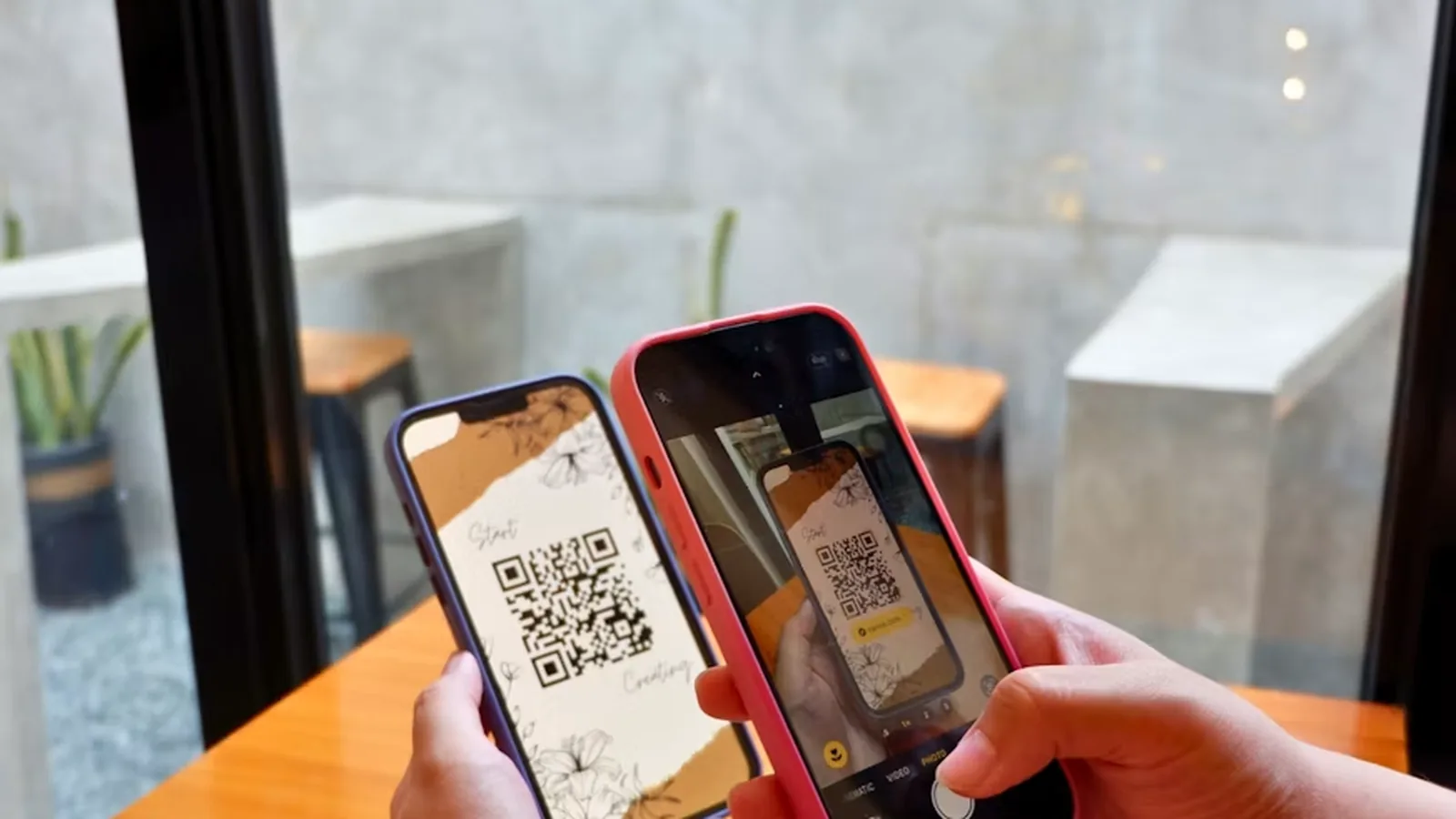
That is what a QR code for your coaching group does. You already had a group sign-up link; now the same link comes as a code people scan with their phone. Point, tap, done. They land in the right client group, already onboarded, and if you want, they get a welcome email the second they join. Two more upgrades in this release make the rest of it hands-off. Here is how to put the QR code to work, then where to put it so it actually brings you clients.
Quick answer
Open a client group, go to its Share screen, and choose Download QR code. Anyone who scans it fills in their details and joins that group, ready to coach. Tick Send welcome email to greet them automatically, and when their program is ready, assign it as Published so it is live for the whole group in one tap.
Generate Your Group's QR Code
There is no new screen to learn. The QR code sits on the same Share screen you copy a group's invite link from, so a group you already have is one click away from a code you can print.
- Open Clients and open the Client Groups filter in the toolbar.
- Choose Create group and name it, or pick a group you already have.
- Open the filter again and choose Share [group name].
- Under Invite QR code, choose Download QR code.
- Print it, stick it up, or show it on your phone.
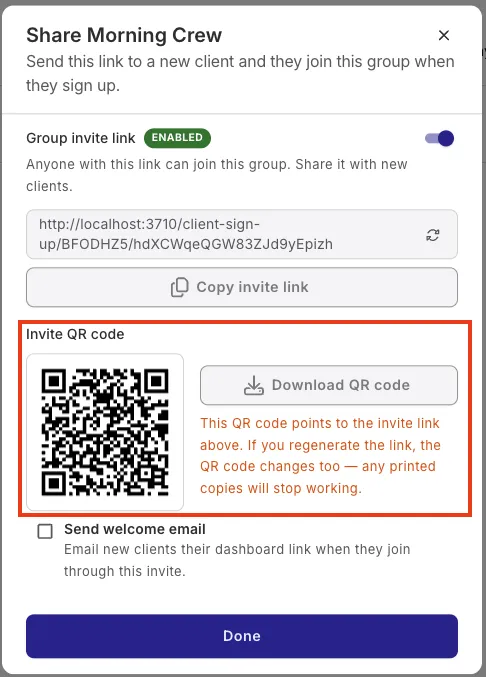
The code points at that group's invite link, so everything you already know about the link still holds. Regenerate or disable the link and the code changes with it, and any copies you printed stop working. That is the safety catch, not a snag: retiring an old flyer or a code that leaked is one click, with nothing to hunt down.
Where to Put Your Coaching QR Code
This is where a small feature turns into a growth habit. A QR code is only worth as much as the places you put it, and coaching gives you more of those than most businesses. Every one below is a person who is already near you, already a little bit interested. The code closes the gap between that interest and a client in your group, before the moment passes.
In the gym or studio, where people already are
The strongest spots are the ones people look at without thinking. A member eyeing your class from the cardio machines can be in your group before they have caught their breath.
- A poster by the front desk or the water fountain
- A sticker on the changing-room mirror or a locker door
- The class whiteboard, or the clipboard people sign in on
- The studio door, so someone who peers in can join before they walk off
On you, your kit and the spaces you rent
You are already visible in a dozen small ways. Add a code to each and they start doing quiet recruitment for you.
- The back of your business card or a rack card at reception
- A flyer in a partner gym, cafe, physio clinic or health-food shop
- Your banner, water bottle or pop-up stand at a market or expo
- A magnet on the car, a patch on the kit bag, a pin on the lanyard
Where your audience already scrolls
A QR code is not just for print. A code on screen scans fine from a second phone, so your online reach becomes a sign-up too.
- An Instagram story or a bio image with the code on it
- The end card of a Reel, a YouTube video or a webinar slide
- Your email signature and the footer of your newsletter
- A handout at a talk, or a slide at a corporate wellness session
Events are where this earns its keep. Run a taster class, an open day, a bootcamp launch or a competition booth, make a group for it, and put its code on the sign-in sheet. Everyone who scans lands in that one group, sorted from the crowd for you, ready for that program the moment the intake closes. One event, one code, a group that fills itself while you coach.
Make your group's QR code now
Create a client group, download its QR code, and put it somewhere people will see it this week. The next person who scans it becomes a client without you typing a thing.
Create your group QR codeWelcome Every New Member Automatically
A scan gets someone into your group. What happens in the next minute decides how the relationship starts. Until now they signed up and then waited, wondering if it worked, while you found out by email and got to them when you could. On a busy intake, that quiet stretch is where first-day energy leaks away.
So on the same Share screen there is a Send welcome email checkbox. Tick it, and everyone who joins that group, by link or by QR code, is emailed their dashboard link the instant they sign up. They open the app while they are still keen, and their first experience of you is fast and organised instead of silent.
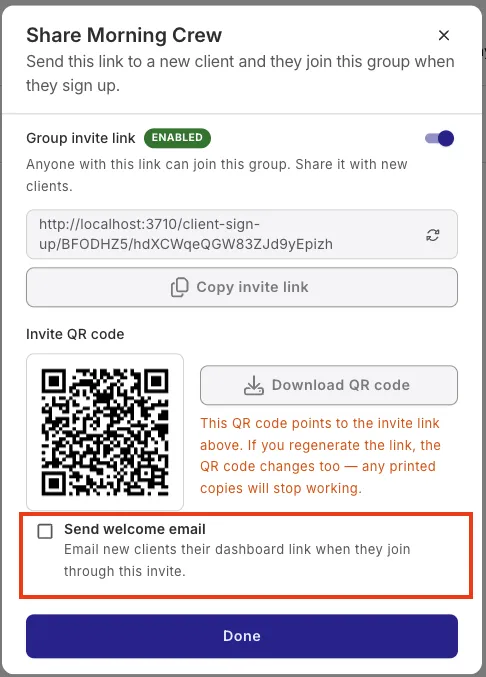
It stays off unless you turn it on, and you set it per link. Some coaches want the warm automatic hello; others prefer to send their own first message with the plan attached and would rather nothing goes out before they do. Both are fine, and nothing changes on your existing links until you open one and tick the box.
Put the Whole Group's Program Live in One Tap
When your group is full, the last step is their program. QuickCoach normally creates an assigned plan as a draft so you can tailor each client's copy first, which is right when everyone needs individual work and a nuisance when the program is finished and the same for the whole group.
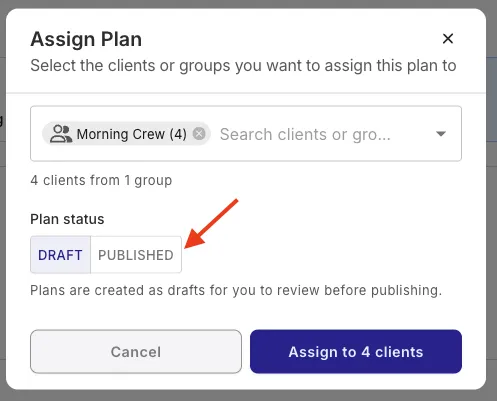
The assign dialog now has a Plan status toggle. Leave it on Draft and nothing changes. Switch it to Published and the plan is live in every selected client's account the moment you confirm. Pick the group, choose Published, and a set challenge or bootcamp program is ready for all of them in one tap.
Put together, the three make a clean line from a stranger to a coached client: they scan your code, they are welcomed automatically, and their program goes live in one tap. Fill the group without the admin, then coach.
What It Costs to Grow a Group This Way
The QR code and welcome emails extend group sign-up links, and bulk assigning a whole group is the Client Groups workflow, all part of QuickCoach Pro. Pro is $39/month, or $32.50/month on annual billing ($390/year), with unlimited clients, so a group that fills itself never costs you more per head as it grows. If you are already on Pro, everything here is switched on in your account now.
Not on Pro yet? Start free and coach up to 20 clients with no card and no time limit, then move to Pro when you are ready to open the doors wider. You would be joining the 40,000+ coaches already running their businesses on QuickCoach. The QuickCoach Pro features and pricing guide lays out everything Pro includes, and if group work is your main model, group coaching software walks through how QuickCoach handles it. For the exact clicks, the Help Center covers QR codes, welcome emails and published plans for client groups.
Frequently Asked Questions
How do I generate a QR code for coaching sign-ups?
In QuickCoach, open a client group and go to its Share screen, where the group sign-up link lives. Generate the QR code from that link and download it. Anyone who scans it opens your sign-up page, enters their details, and lands in that group, ready for you to coach. It works for any group you make.
What happens when a client scans my coaching QR code?
Their camera opens a mobile-friendly sign-up page with your name on it. They enter their name, email and phone, tap Join group, and they are created in your workspace inside that group. No app to find first, no typing from you. If you have ticked Send welcome email, they also get their dashboard link straight away.
Can QuickCoach welcome new clients automatically?
Yes. On a client group's Share screen, tick Send welcome email. Anyone who joins through that group's link, or its QR code, is automatically emailed their dashboard link the moment they sign up. It is off by default and set per link, so nothing goes out until you choose it.
What is the difference between assigning a plan as Draft and Published?
A Draft plan lands in the client's drafts for you to review and tailor before publishing. A Published plan is live in the client's account straight away, with nothing else to do. The Plan status toggle lets you pick when you assign. Choose Published to put a whole group's finished program live in one tap.
Do I need a paid plan for QR codes and welcome emails?
The QR code and welcome emails extend group sign-up links, and bulk assigning a whole group is the Client Groups workflow, all part of QuickCoach Pro. Pro is $39/month, or $32.50/month on annual billing ($390/year), with unlimited clients. You can start free for up to 20 clients with no card, then move to Pro when you are ready to fill a group.
Turn your next room into a sign-up sheet
Create a client group, download its QR code, and put it on the wall, the mirror or the back of your card. Clients scan themselves in, get welcomed automatically, and start on a program you publish in one tap.
Start freeFeature details reflect the Client Groups improvements released in QuickCoach Pro, September 2026. Spot something that does not match what you see in the app? Tell us and we will fix it: support@quickcoach.fit.