If you are still weighing whether to move clients to coaching software at all, start with the wider case in our guide to moving coaching off spreadsheets and WhatsApp. That page owns the why. This one owns the how: the order of work that gets a roster moved without the lost weekend everyone fears.
The short answer
The move is a weekend job in five steps. Pick a cutover date and keep it to yourself. Build the library and one template. Rebuild your priority clients by hand. Invite them. Run both systems for a week, then switch the old one off. There is no import, so the work is up front.
Before you touch anything: pick a cutover date and tell nobody yet
The cutover date is the line between the old system and the new one. Pick it two weeks out and keep it to yourself. Telling clients before the invite message lands creates a half-migrated state where some clients wait for a message that has not arrived and the rest drift.
The date does three jobs. It forces the scope: everything before it is preparation, everything after it is delivery. It gives the double-run window a defined end. And it means the old system gets switched off on purpose, not abandoned when you get distracted.
Pick a quiet week. Not exam week for your university clients, not the fortnight before a local comp. The move does not need a perfect weekend. It needs one without a deadline landing on top of it.
Saturday morning: the library and one template
Start with the exercise library, not the client list. Most coaches reach for the same thirty to fifty exercises week after week, and the library is the thing every program clones from. Get it right once and the rest of the weekend is assembly, not invention.
If your library is empty, import from the QuickCoach Library. Almost 1,400 ready-made exercises arrive with a video and a description you can edit, so Saturday morning becomes renaming and adjusting rather than building from a blank page. Rename the movements the way you talk about them, because your clients will read those names.
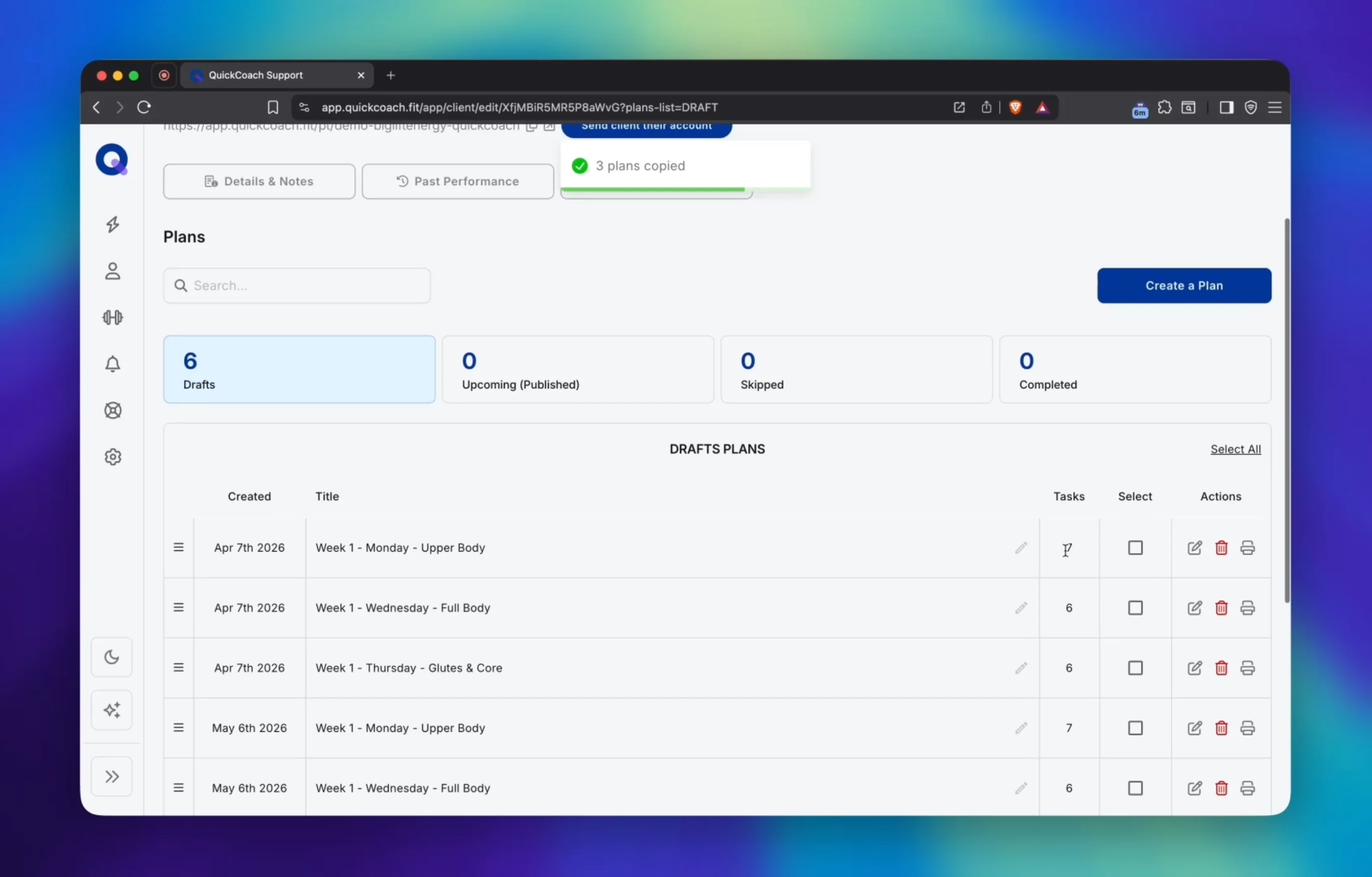
Then save one template: the program shape you assign most. For most coaches that is a four-week block, three to four sessions a week, built from the movement families the platform data says dominate. The template is the starting point every client program clones from, and it is the hour of the whole weekend that pays back most. The full template-library workflow, including how to match clients to the right starting point, is in our guide to writing client workout programs faster.
Cloning and templates are free features on the free tier, and the pairing is worth a look in our two-tips guide to building repeating workout programs faster. The same setup that speeds up one program is what makes moving a whole roster possible in a weekend.
Saturday afternoon: the client list, in priority order
Do not move everyone on the same day. Number the list by who moves first: the clients mid-cycle who check in weekly, the ones who reply to everything, the ones who would visibly benefit from seeing their plan and history in one place. That is your pilot group, three to five people.
Rebuild their active programs by hand. There is no import, which is the honest price of the weekend, and the template is what keeps that price low. Clone the template, adjust the movements and loads for the client, rename it, assign it. The first client takes the longest because it is also the first time you use your own library properly. The fifth takes half the time of the first.
Keep a note beside each name of anything that must not be lost in the move: an injury cue, a preferred rep range, the note about their knee. The record is recreated by hand once, so the one thing worth slowing down for is carrying the context across, not the exercise list.
The invite message that gets clients to actually log in
The client app is a Progressive Web App, so nobody visits an app store. The client opens the link in their phone's browser, taps add to home screen, and it behaves like a native app in about thirty seconds on both iOS and Android. The invite message does two jobs: it says the coaching continues, and it makes the first log-in feel like a minute, not a chore.
What the client meets on the other side of that log-in, the first screen, the daily view and the check-in, is the subject of our guide to what clients see in a coaching app.
Copy-paste invite message
Hey [name], quick change on my end. Your training is moving into an app so your program, your check-ins and your history live in one place you can open any time. I'll send you a link, you tap it and add it to your home screen, and you're in. Takes about a minute. Same coaching, same plan, less back-and-forth.
CopiedClients never pay for any of this. The client app is free for clients on both tiers. Nobody enters a card and nobody sees a pricing page, which means the invite can say what it should say: this is a change on your end, not a bill on theirs.
And the invite works the other way too. When a fellow coach sees the app and asks what you moved to, the Free with Friends referral program pays you $10 in monthly credit for every coach you bring across, for up to six months per referral, and the coach you refer gets 50% off their first month of Pro. The link is worth sharing when it comes up naturally.
Week one: run both systems, deliberately
The spreadsheet does not get deleted on Sunday. It becomes the archive, and the app becomes the working copy. For the first week you run both, on purpose, and the difference between that and chaos is one rule.
The rule: every operational touch happens in the app. Check-ins get answered in the app. Program changes get made in the app. The old files only get opened for reference, and the moment you stop opening them, the cutover is done. Nobody needs a perfect migration. They need a boundary they keep for a week.
The first fortnight on any new system deserves the same care as a new client's first fortnight, which is why the day-by-day version lives in our guide to client onboarding for online coaches. The tools are different, the retention stakes are the same.
When to switch the spreadsheet off for good
The signal is boring and reliable: when you realise you have not opened the old files since Tuesday, switch them off. Archive, do not delete. Old programs, check-ins and chat threads stay where they are unless you need them operationally, because keeping them costs nothing and recreating them costs a weekend.
Two things make the switch stick. Tell the pilot clients they are now in the app, so the boundary is spoken out loud. And give yourself a finish line: the last check-in logged in the old system is the last one, full stop. After that the old files are a reference shelf, not a second desk.
How long moving clients to coaching software actually takes
| Job | Realistic time | Notes |
|---|---|---|
| Library plus one template | 2-3 hours, once | The chunk that pays back most. Everything after it clones from this. |
| Pilot of 3-5 clients | 3-5 hours | Programs rebuilt by hand from the template, context notes carried across. |
| Full roster of 10-15 clients | 8-14 hours across a week or two | The double-run window absorbs this; nobody has to do it in one sitting. |
| Each client after the template | 15-30 minutes | Clone, adjust, rename, assign. Plus two minutes per invite. |
The honest number that matters is not the weekend total. It is the weekly total after. Coaches who run the double-run properly report the Sunday admin they used to do drops to near zero, because the record stops being re-created every week and starts being read. The pilot runs on the free tier, and our comparison of the best free coaching software in 2026 shows what a real free tier covers before you commit to anything.
Pilot with three clients before the full move
The free tier exists so this is a genuine pilot, not a trial with a clock on it. Build the library, save one template, move three clients, and run both systems for a week. Free for up to 20 active clients, with no time limit.
Start the pilot freeFrequently asked questions
Can I bulk-import clients?
No. QuickCoach does not have a native import or export, so client records and programs are rebuilt by hand. Templates and cloning are what make that manageable, and the library import handles the exercise list, but there is no one-click client migration. Better to know that on Saturday morning than discover it on Sunday night.
What about historical results?
Leave them where they are. Old programs, check-ins and chat threads stay in the old tools as an archive you can still read, which costs nothing to keep and cannot be recreated if lost. If a result becomes operationally important, copy it into the new record. Otherwise the archive is the answer.
Will clients need to pay?
No. The client app is free for clients on both tiers. Clients never enter a card and never see a pricing page. What changes between the tiers is your branding and the extras you switch on, not what clients pay.
What if someone refuses to move?
Keep them on the old channel for a defined window, then have the conversation again. The relationship outranks the tool, and a client who is otherwise happy does not get fired for preferring email. In practice most come across within a fortnight once they see their plan in the app.
Published August 2026. This page sits inside the wider migration cluster, and every guide in it lives on the coaching guides hub: the pillar for the case to move, the switching guide for the platform decision, and the check-in system for the record side once clients are across. If the move is still stuck on a specific client, the support inbox is open at support@quickcoach.fit.